
You’re Not Behind: Your Practical Guide to Learning AI Today
Let me guess — you’ve been using AI, or at least hearing about it, for a while now. ChatGPT, maybe. Google’s AI features. Perhaps you’ve even asked Siri or Alexa something and thought, “okay, that’s kind of impressive.”
But then someone dropped the term Large Language Models — LLMs — and suddenly the conversation felt like it moved to a different level. Like everyone got a memo you didn’t receive.
Here’s the truth: most people using AI every day have no idea what an LLM actually is. They just know it works. And that’s fine — until the day you want to use it BETTER, use it smarter, or build something with it. That’s when understanding the engine under the hood starts to matter.
This guide bridges that gap. We’re going to take what you already know about AI — the tools you’ve touched, the hype you’ve absorbed — and go one layer deeper. Not into confusing math or academic research papers. Into the practical, working knowledge that turns a casual AI user into someone who genuinely knows what they’re doing.
You are not behind. The people winning with AI right now aren’t the ones who started earliest. They’re the ones who built a real foundation — and that’s exactly what we’re building today.
I’ll walk you through how LLMs work, how to learn them strategically, which tools are worth your time, and how to stay sharp without burning out. Real steps. Real tools. No fluff.
The AI era isn’t arriving. It’s already here. Let’s make sure you’re ready for it.
Ready? Let’s go.
Section 1: Demystifying LLMs — What You Actually Need to Know
Let’s talk about the “magic” behind the curtain. Not because you need to become an engineer, but because understanding the basics makes you a MUCH smarter user — and user intelligence is a competitive advantage.
What Are Large Language Models (LLMs)?

An LLM is, at its core, a very sophisticated prediction machine. It’s trained on massive amounts of text data — books, websites, code, conversations — and learns to predict what word comes next in any given sequence. Do that billions of times, across billions of parameters, and you get something that sounds startlingly human.
The architecture powering most LLMs today is called the Transformer. Introduced by Google researchers in 2017, the Transformer changed everything. It uses a mechanism called attention that allows the model to understand which parts of a sentence are most relevant to each other — kind of like how your brain focuses on the key words in a conversation without dissecting every syllable.
Here’s a simplified way to think about it:
- Tokenization: The model breaks text into chunks called “tokens” (roughly 3–4 characters each). It processes these tokens, not whole words.
- Probability: For every token it generates, the model is essentially asking: “Given everything I’ve seen, what is the most likely next word?” That’s it. Multiply that simple act by billions of parameters, and you have ChatGPT.
- Hallucinations: Because LLMs predict likely text (rather than retrieve facts), they sometimes confidently say things that are… completely wrong. This is called a hallucination. Knowing this makes you a better, more critical user.
You don’t need to memorize this. But holding this mental model — “it’s a very smart prediction engine” — will shape how you prompt it, how you verify its outputs, and how you use it without getting burned.
The Difference Between “Power Users” and “Builders”

Before you decide how deep to go, ask yourself one question: What do I want to DO with AI?
There are two main paths:
| Path | Who It’s For | What You’ll Do | Coding Required? |
| Power User | Marketers, writers, managers, creators | Prompt, automate, analyze using existing tools | No |
| Builder | Developers, data scientists, entrepreneurs | Build apps, fine-tune models, create pipelines | Yes (Python) |
Most people — including most highly paid professionals — are Power Users. And being a great Power User is genuinely powerful. I’ve seen marketers double their content output and financial analysts cut research time in half, all without writing a single line of code.
You don’t have to choose one path forever, either. You can start as a Power User and graduate into building when (and if) you want to.
Key Terms for Your Toolkit
Before we move on, here’s a quick glossary of terms you’ll hear constantly. Bookmark this.
| Term | What It Means (Plain English) |
| LLM | A large AI model trained on text, like GPT-4, Claude, or Gemini |
| Prompt Engineering | The skill of writing clear, strategic inputs to get the best AI outputs |
| Fine-tuning | Re-training an existing model on your specific data to make it smarter for your use case |
| RAG | Retrieval-Augmented Generation — giving an LLM access to external documents so it uses your data, not just its training |
| Inference | The process of running a trained model to generate output (i.e., when you ask it a question) |
| Context Window | The maximum amount of text an LLM can “remember” in one conversation |
| Hallucination | When an AI confidently states something false |
| Open-source Model | An AI model whose weights are publicly available (like Llama 4 or Mistral) |
Print this. Screenshot it. You’ll be surprised how quickly these terms start making sense once you encounter them in the wild.
Section 2: Building Your AI Learning Roadmap (2026 Edition)
Now let’s get practical. I’m giving you a phased roadmap — the same one I wish someone had handed me when I started. Don’t rush this. Each phase builds on the last, and consistency beats intensity EVERY time.
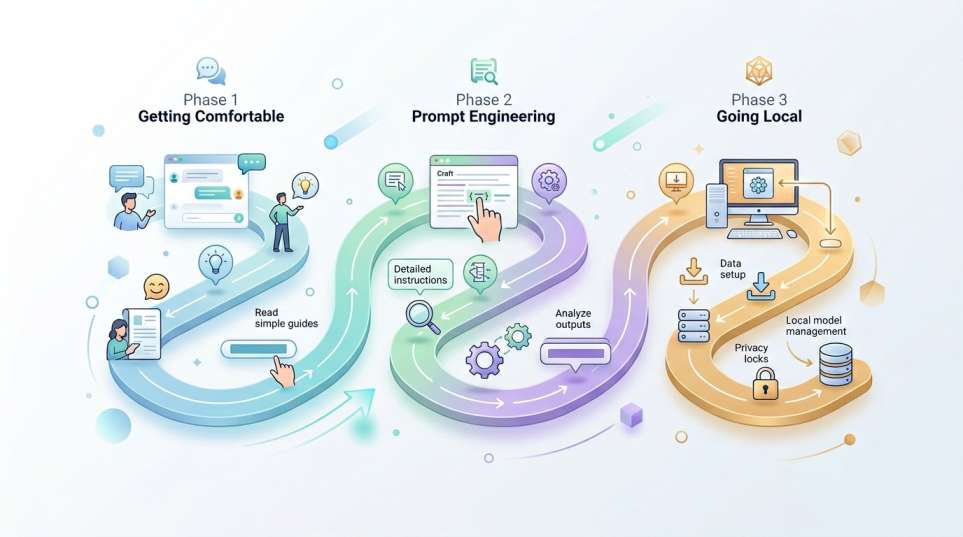
Phase 1: Getting Comfortable (Weeks 1–2)
Your first job is simple: get your hands on the tools and play.
The three interfaces every AI learner should explore first are:
- ChatGPT — The most widely used AI assistant in the world. GPT-4o is available on the free tier. Start here.
- Claude — Built by Anthropic, Claude is exceptional at nuanced writing, long documents, and thoughtful reasoning. Personally, I find Claude’s responses feel more human and less robotic than most alternatives.
- Gemini — Google’s flagship AI, outstanding for tasks tied to the Google ecosystem (Docs, Gmail, Drive) and handling very large documents.
💡 Pro Tip: Don’t just “test” these tools with random questions. Use them on a real task — something you actually need this week, like drafting an email, summarizing a document, or brainstorming an idea. That’s how you learn what these tools can ACTUALLY do.
Spend one week exploring all three. Write down what each does well, what frustrates you, and what surprises you. This week alone will put you ahead of 80% of people who’ve only heard of AI but never seriously used it.
Phase 2: The Art of Prompt Engineering (Weeks 3–4)
Once you’re comfortable using these tools, the next unlock is learning how to prompt them effectively. Prompt engineering is — hands down — the highest-ROI skill in the AI space for non-coders.
Think of a prompt as a job brief for your AI employee. The clearer and more specific your brief, the better the output.
Here’s a progression from beginner to advanced:
Level 1 — Basic Prompting (Most people stop here):
“Write me a blog post about AI.”
Level 2 — Contextual Prompting:
“Write a 500-word blog post about learning AI for beginners. Use a friendly, conversational tone. Include three actionable tips.”
Level 3 — System-Level Prompting:
“You are an expert content strategist with 10 years of experience writing for a tech-savvy but non-technical audience. Your goal is to educate readers about learning AI. Write a 500-word introductory blog post…”
Level 4 — Few-Shot Prompting: You give the AI examples of what you want before asking it to produce something.
“Here are two examples of the tone I want: [Example 1] [Example 2]. Now write a section about prompt engineering in the same style.”
The jump from Level 1 to Level 4 produces dramatically better results. I’m talking night-and-day quality difference. Practice this daily.
💡 Pro Tip: Save your best-performing prompts in a personal library (a simple Notion doc or Google Sheet works perfectly). Over time, this becomes one of your most valuable professional assets.
Phase 3: Going Local — Running AI on Your Own Machine
Once you’re past the basics, I want to introduce you to something that changes the game completely: running AI models locally, on your own computer.
Why does this matter?
- Privacy — Your data never leaves your machine.
- Cost — Free, after the initial setup.
- Experimentation — You can test open-source models that aren’t available on paid platforms.
Two tools make this incredibly easy:
Ollama — A command-line tool that lets you download and run open-source models (like Meta’s Llama 4 or Microsoft’s Phi series) with a single command. I genuinely love this tool. It’s fast, clean, and powerful. The Phi series of small models, by the way, is WILD — they’re compact enough to run on a standard laptop but deliver quality that rivals much larger cloud-based models.

bash
# That’s literally all it takes to run Llama 4 locally:
ollama run llama4
LM Studio — If you’re not comfortable with the command line, LM Studio gives you a beautiful desktop interface to download, manage, and chat with local models. It’s the most beginner-friendly way to go local, and it runs on Mac, Windows, and Linux. Think of it as a Netflix-style browser for open-source AI models.
Starting with Ollama or LM Studio is one of the most empowering steps you can take as an AI learner. When you run a model locally and realize you’re having a real conversation with AI that’s 100% private and 100% free — that feeling is something else entirely.

Section 3: Essential Tools for Your AI Journey
Here’s where things get exciting. Let me walk you through the best AI tools organized by what you’re actually trying to do — because “best AI tool” means nothing without context.
3.1 For Productivity: Automate the Boring Stuff
If your goal is to reclaim time from repetitive tasks — email drafting, scheduling, research, summarization — these tools are your starting point:
- ChatGPT (with GPT-4o): Draft emails, create templates, summarize meeting notes, generate first drafts of almost anything. The free tier is surprisingly capable.
- Claude: Exceptional for long-form writing, analyzing large documents, and tasks that need careful, nuanced thinking. I use Claude for anything that requires precision — it’s particularly strong with instructions that have multiple conditions.
- Perplexity: Think of it as a search engine reimagined for AI. It gives you AI-synthesized answers WITH real-time citations from the web. Perfect for research tasks where you need current information.
💡 Pro Tip: Use Claude or ChatGPT to build a “Personal AI Operating System” — a set of custom system prompts for every task you do regularly. One for email, one for analysis, one for content. This saves you hours weekly.
3.2 For Analysis: Work Smarter with Your Own Data
This is where AI gets TRULY transformative for knowledge workers:
NotebookLM — Google’s NotebookLM is one of the most underrated tools available today. You upload your documents, PDFs, research papers, or notes — and then you can have a conversation with them. Ask it to summarize, find contradictions, generate study guides, or explain complex sections. It’s RAG in a beautiful, easy package. I’ve used NotebookLM to analyze 200-page reports in minutes.
RAG-based tools (Retrieval-Augmented Generation, remember?) — If you want to get more technical, tools like LlamaIndex let you build your own personal RAG pipeline. You feed it your data — PDFs, databases, notes — and it enables an LLM to query YOUR information intelligently. This is incredibly powerful for researchers, analysts, and content creators managing large information libraries.
3.3 For Development (Optional): Building with LLMs
If the builder path calls to you, here are the frameworks that matter:
LangChain — The most popular framework for building applications powered by LLMs. It gives you building blocks to connect LLMs to databases, APIs, and other tools. Think: “I want to build a customer service bot that reads from our internal knowledge base.” LangChain makes that happen.
LlamaIndex — Specialized in connecting your data to LLMs. If your use case is data-heavy — querying large document collections, building knowledge bases, or creating search systems — LlamaIndex is your best friend.
Cursor — If you write any code at all, Cursor is transformative. It’s a VS Code fork with AI deeply integrated into the coding experience. You can describe what you want to build in plain English and watch it write the code. I know developers who say it’s cut their coding time in half.
Here’s a simple overview to help you choose:
| Tool | Best For | Skill Level Needed |
| ChatGPT / Claude / Gemini | Daily productivity, writing, analysis | Beginner |
| NotebookLM | Document analysis, research | Beginner |
| Perplexity | Real-time research & fact-checking | Beginner |
| Ollama / LM Studio | Running local, private AI models | Intermediate |
| LangChain / LlamaIndex | Building LLM-powered apps | Advanced |
| Cursor | AI-assisted coding | Intermediate |
Section 4: Staying Ahead Without Burning Out
Here’s where I’m going to be real with you for a second: the AI space moves FAST. New models, new tools, new research — every single week. If you try to keep up with everything, you will burn out and quit.
So here’s how I recommend you stay sharp without losing your mind.
4.1 Filter the Noise Ruthlessly

Not every new model announcement matters to you. Not every AI newsletter deserves your attention. Here’s my curated short-list of signal-to-noise leaders:
- Hugging Face — THE hub for open-source AI models, datasets, and research. If a new model is worth knowing about, it lands here. Follow the trending models section weekly.
- The Rundown AI (newsletter) — Consistently excellent, daily AI news in under 5 minutes. Perfect for busy people.
- Ben’s Bites (newsletter) — Thoughtful commentary on AI developments with a business lens.
- Andrej Karpathy on X — One of the original OpenAI team members. When he explains something, you listen.
💡 Pro Tip: Batch your AI learning. Designate 30 minutes twice a week to read your newsletters and scan Hugging Face’s trending page. That’s it. You don’t need to be plugged in every hour to stay genuinely informed.
4.2 Develop an “AI-First” Mindset
This is less about tools and more about how you think.
An AI-first mindset means that when you face ANY problem or task, your first question is: “Can AI help with this?” Not always — sometimes human judgment is irreplaceable. But often, AI can handle the 80%, freeing you to focus on the 20% that actually needs you.
Practically speaking, this means:
- Before doing a task manually, ask: Is there an AI tool or prompt that can produce a first draft of this?
- Before learning a skill from scratch, ask: Can I use AI to compress my learning time?
- Before hiring for a task, ask: Is this something AI-assisted workflows could cover?
This mindset shift — from seeing AI as a novelty to treating it as a professional tool — is what separates people who merely talk about AI from those who actually profit from it.
4.3 Continuous Learning — Your Most Valuable Asset
Here’s something I genuinely believe: curiosity is a career strategy.
The people who will win in an AI-augmented economy aren’t the ones who learned AI perfectly in 2024 and stopped. They’re the ones who stayed curious, kept experimenting, and adapted as the landscape shifted.
You don’t need to become an AI researcher. You need to:
- Experiment weekly. Pick one new AI feature, tool, or technique and try it on a real task.
- Teach someone else. Nothing consolidates learning like explaining it. Share what you learn with a colleague, a friend, or on social media.
- Fail forward. Some of your prompts will be terrible. Some tools won’t work for you. That’s not failure — that’s calibration.
The AI field will look dramatically different in two years. The people who succeed aren’t the ones who figured it all out today. They’re the ones who built the habit of learning.

Conclusion
Let’s bring it home.
You started this article feeling like you might be behind. I hope you’re leaving with a completely different feeling — because you’re not behind. You’re exactly where millions of thoughtful, curious people are right now. The difference is, you just got a roadmap.
Here’s what we covered:
- LLMs aren’t magic — they’re sophisticated prediction engines, and understanding that makes you a smarter user.
- There are two paths: Power User and Builder. Both are valuable. Pick the one that fits your goals.
- Your learning roadmap has three phases: Getting Comfortable, Mastering Prompt Engineering, and Going Local.
- The best tools right now — ChatGPT, Claude, NotebookLM, Ollama, LM Studio, and LangChain — cover almost every use case from productivity to development.
- Staying ahead doesn’t require burnout. It requires filtering the noise, adopting an AI-first mindset, and keeping curiosity alive.
Here’s your action step for THIS week:
Pick ONE of the following and do it before Friday:
- Create a free account on Claude.ai and use it to complete a real work task — drafting an email, summarizing a document, or brainstorming a project.
- Download Ollama and run your first local model.
- Upload a document you’ve been meaning to analyze into NotebookLM and have a conversation with it.
Just one. That single step is worth more than reading ten more articles.
The future doesn’t belong to AI. It belongs to people who know how to work with it. And right now — today — you’re building exactly that skill.
You’re not behind. You’re just getting started. And honestly? That’s the best place to be.

FAQs: Learning AI in 2026
What is an LLM?
An LLM (Large Language Model) is a type of AI trained on massive datasets to understand and generate human-like text. Examples include ChatGPT (OpenAI), Claude (Anthropic), and Gemini (Google).
Do I need to know how to code to learn LLMs?
No. As a Power User, you can get enormous value from AI tools without writing a single line of code. Coding (specifically Python) is only required if you want to build custom AI applications.
What is fine-tuning?
Fine-tuning is the process of further training a pre-existing model on a smaller, specific dataset to improve its performance for a particular task — like training a general model to specialize in medical or legal language.
Is it free to learn about LLMs?
Yes! Many foundational resources are completely free. ChatGPT’s free tier, Claude’s free tier, Ollama, LM Studio, NotebookLM, Hugging Face, and Google’s AI courses all cost nothing to get started.
How long does it take to learn?
You can become a confident Power User in 2–4 weeks with consistent daily practice. Building custom AI applications (the Builder path) typically takes several months of focused learning.
What is RAG?
RAG stands for Retrieval-Augmented Generation. It’s a technique that allows an LLM to access your external documents or databases in real-time, so it can answer questions based on YOUR data — not just its training data.
Are there privacy concerns with LLMs?
Yes. Cloud-based tools like ChatGPT and Claude send your prompts to external servers. For sensitive data, use local models via Ollama or LM Studio — your data never leaves your machine.
What hardware do I need to run local models?
A modern laptop is often sufficient for smaller models like the Phi series. A dedicated GPU dramatically improves performance for larger models, but it’s not required to get started.
How do I stay updated without burnout?
Follow Hugging Face’s trending page and 1–2 quality newsletters like The Rundown AI. Batch your learning to two 30-minute sessions per week. More than that is noise.
What is prompt engineering?
Prompt engineering is the skill of structuring your inputs to get the most accurate, useful, and relevant output from an AI model. It’s the highest-ROI non-technical skill in the AI space today.